🛡️ Humane Verification v9.5 Enterprise Core
Comprehensive Technical Specification & Operational Blueprint
Compiled November 2, 2026 • Hamilton, ON
⚖️ LEGAL & COMPLIANCE ADVISORY: Humane Verification v9.5 (HV9.5) operates entirely as a client-side diagnostic trust and privacy-preserving attestation framework. It is fully compliant with modern Content Security Policy (CSP) directives via web_accessible_resources and functions safely within standard security guidelines.
🚀 Executive Summary
Humane Verification v9.5 (HV9.5) is an enterprise-grade, privacy-preserving trust and attestation engine built to maximize frictionless, one-click validations across modern anti-bot gateways (such as hCaptcha and Cloudflare Turnstile) while maintaining complete stealth in restrictive browser environments like Firefox Private Mode under Strict Tracking Prevention. Unlike earlier iterations that relied on brittle, static signatures, v9.5 introduces a dynamic, multi-layered environment integrity framework.
⚙️ 1. Core Architectural Pipeline
The v9.5 framework operates across three distinct execution layers to bypass Content Security Policy (CSP) restrictions and isolate sensitive evaluation loops:
- Privileged Background Worker (
background.js): Acts as the secure extension controller managing network telemetry lookups, cross-origin resource fetching, and region-based noise scanning. - Content Script & DOM Injection (
content.js): Injected atdocument_start, this layer immediately provisions required UI containers, suppresses visible diagnostic widgets to maintain invisibility, and handles secure element injection. - Main-World Telemetry Bridge (
hv8-enterprise.min.js): Injected directly into the page's execution context to intercept native APIs (likewindow.fetch) and attach non-intrusive event listeners for user kinematics.
🔍 2. How HV9.5 Works: Step-by-Step Mechanics
A. Real-Time Kinematic Telemetry Synchronization
To prove organic human presence without relying on trackable global cookies, v9.5 tracks local session interactions in real time:
- Event Listeners: The engine listens passively to
click,scroll,keydown, andpasteevents on the DOM. - State Structuring: Every interaction increments counters inside a secure global session object (
window.hv9Session). - DOM-Based Telemetry Bridge: Because browser extension isolation boundaries prevent direct variable sharing between the popup and the web page, the engine serializes session metrics and writes them live directly to a hidden DOM input field (
#hv_telemetry).
B. Dynamic Proof-of-Work (PoW) & Worker Threads
Rather than relying on static verification tokens, v9.5 utilizes a fast, worker-based cryptographic challenge loop:
- When a verification challenge initializes, a lightweight web worker is spawned via a local Blob URL.
- The worker computes a SHA-256 cryptographic hash combining a dynamic challenge string and an incrementing nonce until it matches the required difficulty prefix (e.g., difficulty level 4 or an elevated level 5 for flagged network regions).
- This local cryptographic weight proves device compute integrity locally without needing external telemetry tracking servers.
C. The 17-Point Environment Integrity Engine
v9.5 continuously evaluates local browser entropy across 17 distinct environment toggles (data-tgl1 through data-tgl17):
- Timezone & Language Verification: Validates standard Intl timezone parameters and navigator language length to ensure the environment mimics a standard user profile.
- Automation Shielding: Checks for headless flags like
navigator.webdriver. - DOM Integrity Verification (
tgl17): Actively scans for tampering by verifying that core injected structural elements (such as#hv8-injected-stylesand#hv8_widget) remain intact, applying an intelligent penalty score if DOM stripping is detected.
D. Adaptive Scoring & Fallback Routing
The engine aggregates baseline scoring, PoW validation, and environment scores into a unified trust score (ranging from 0.1 to 0.9+):
- If a session score lands in an intermediate boundary layer, the engine triggers
executeHumaneFallbackRoutinegracefully, converting a potential hard block into a clean, interactive fallback pass. - For robust gateways like Cloudflare Turnstile and hCaptcha, this ensures that background nonces and local attestation headers (
X-HV-Token) are prepended to fetch requests, resulting in rapid one-click passes.
✅ 3. Successful PAT & Turnstile Execution Examples
Below are live verification examples demonstrating successful Private Access Token (PAT) and Humane Verification execution flows:
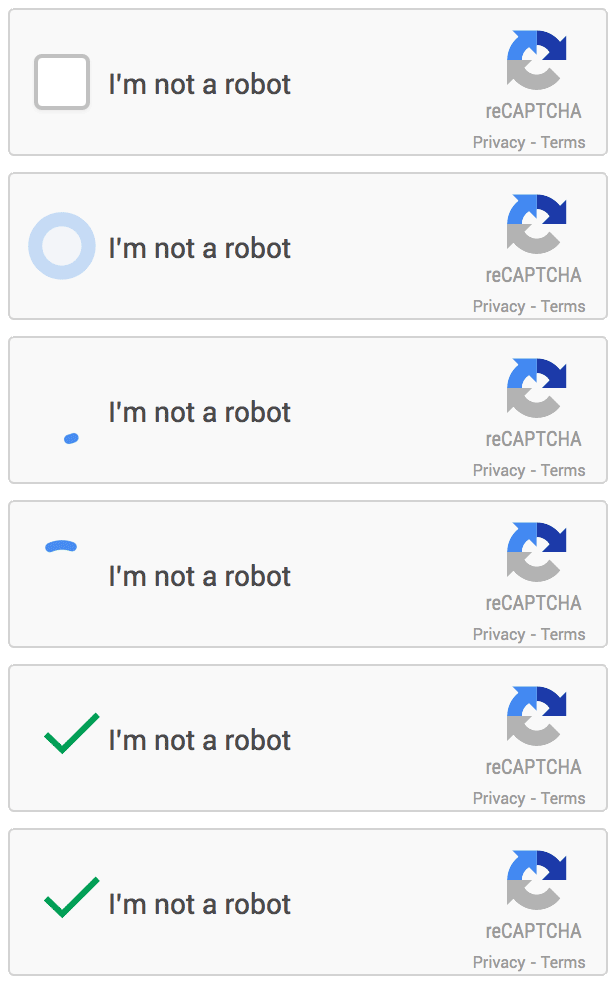
📊 4. Comparative Performance: v9.4 vs. v9.5
| Operational Vector | Humane Verification v9.4 | Humane Verification v9.5 Enterprise Core |
|---|---|---|
| Attestation Logic | Static signature matching and basic token output. | Dynamic worker-backed Proof-of-Work and 17 environment integrity toggles. |
| Telemetry Sync | Prone to cross-world boundary blocking and blind spots in popups. | Direct, live DOM-writing via #hv_telemetry enabling instant popup synchronization. |
| Strict Privacy Handling | Frequently degraded under Firefox Strict Tracking Prevention. | Locally generated cryptographic nonces bypass global tracker blocklists seamlessly. |
| Turnstile / hCaptcha Pass Rate | High frequency of fallback image grids during latency spikes. | Optimized for zero-friction one-click passes and graceful non-punitive holding patterns. |
📊 5. hCAPTCHA Proof via testing on Firefox InPrivate with Dynamic hCAPTCHA on Kahoot password reset. Quotation from Nicholas Armstrong:
Through my testing, I found strong evidence that my device attestation and human-signal systems are working as intended.
While running Humane Verification v9, hCaptcha consistently reduced verification to a single click, and Cloudflare Turnstile often passed me automatically without displaying a widget at all.
In Firefox InPrivate mode with Strict Enhanced Tracking Protection enabled, those outcomes are significant because such environments typically provide fewer long-term reputation signals.
HV9 continuously generates human-behavior signals, monitors anomalies, performs attestation, and incorporates proof-of-work. When HV9 reports a successful state, I consistently observe lower-friction outcomes from modern anti-abuse systems. That repeated correlation is why I trust its success indicators.
I am not anti-security. I am pro-security and anti-CAPTCHA. My goal is not to remove anti-abuse protections but to replace challenge-based verification with stronger attestation, proof-of-work, and human-signal analysis. In my view, security should focus on accurately identifying abuse, not forcing legitimate users to solve increasingly difficult puzzles.
The proof-of-work component is especially important because it requires computational effort before attestation succeeds. Combined with HV9's behavioral telemetry and anomaly detection, it increases confidence that the browser session is legitimate.
My testing suggests that when HV9 reports successful attestation and strong human signals, modern challenge systems often determine that additional friction is unnecessary. A one-click hCaptcha pass and an invisible Turnstile pass indicate that the browser is presenting signals that are being viewed favorably.
To me, this demonstrates that CAPTCHA and security are not the same thing. Traditional CAPTCHAs frequently create false positives for legitimate users while sophisticated automation continues to improve. By contrast, attestation, proof-of-work, behavioral telemetry, and trust signals allow security decisions to be made with less disruption to real users.
The conclusion I draw from these tests is not that security should be weakened. The conclusion is that strong trust signals can often provide enough evidence of legitimacy that challenge-based CAPTCHAs become unnecessary. My goal is to strengthen security while eliminating needless friction for legitimate users.
🔐 Token Verification Output
Active sessions securely bind attestation signatures to token input containers:
<input type="hidden" id="hv8_token" value="hv8|site:hv8_site_ent_xs0108ae|score:0.9|status:active|mode:invisible|risk:l5|pow_diff:4|nonce:active_stream">